Showing posts with label drawing. Show all posts

8/10/12

Characters: Chicks and Clouds


In the Brothers Grimm's original story, it's the pigeons who help Cinderella pick up the beans. "And the pigeons nodded with their heads and began pick, pick, pick, pick, and the rest began also pick, pick, pick, pick, and gathered all the good grains into the dish".

Here we suppose Cinderella lived in a little farm, so the pigeons are simplified as three little chicks. The animation of them is to wave their wings, shake the body and talk with each other so that they can tell the situation of Cinderella. 
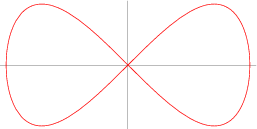
Eight Curve
The algorithm designed for the chicks are inspired by a curve named  Eight Curve.
x=asint

y=asintcost.


So that change the pushMatrix and rotate function we can see the chick moving.
void draw() {
  strokeWeight(bodyStroke);
  stroke(brown.getRed(), brown.getGreen(), brown.getBlue());
  fill(yellow.getRed(), yellow.getGreen(), yellow.getBlue());
  //http://mathworld.wolfram.com/EightCurve.html
  pushMatrix();
  translate(xpos, ypos - yTrans);
  rotate(-HALF_PI + (rotate + bodyAnimations)/PI);

  beginShape();
  for (int i=180; i<360; i++)
  {
    float x = sin( radians(i) ) * radius;
    //The exponent a controls the shape of the curve
    float y = cos( radians(i) ) * sin( radians(i) ) * radius;

    vertex(x, y);
  }
  endShape();
  popMatrix();
 
  line(xpos-footLen, ypos - footLen , xpos- footLen, ypos+ footLen * 0.5f);
  line(xpos-footLen, ypos+ footLen * 0.5f, xpos- footLen * 1.3f, ypos + footLen * 0.8f);
  line(xpos-footLen, ypos+ footLen * 0.5f, xposfootLen * 0.7f, yposfootLen * 0.8f);
  line(xpos+footLen, ypos- footLen, xpos + footLen, ypos+ footLen * 0.5f + feetAnimations);
  line(xpos+footLen, ypos+ footLen * 0.5f + feetAnimations, xpos+ footLen * 1.3f, ypos + footLen * 0.8f + feetAnimations);
  line(xpos+footLen, ypos+ footLen * 0.5f + feetAnimations, xpos+7, ypos+ footLen * 0.8f + feetAnimations);
  fill(brown.getRed(), brown.getGreen(), brown.getBlue());
  if( words.length() > 0 && words.length()  % 2 == 0) {
  triangle(xpos + wingPosX1, ypos - wingPosY1,xpos  + wingPosX2, ypos - wingPosY2,xpos + wingPosX3, yposwingPosY3);
    triangle(xpos - wingPosX1, ypos - wingPosY1,xpos  - wingPosX2, ypos - wingPosY2,xpos - wingPosX3 , yposwingPosY3);
  }
  else {
  triangle(xpos + wingPosX1, ypos - wingPosY1,xpos  + wingPosX2, ypos - wingPosY2,xpos + wingPosX4, yposwingPosY4);
  triangle(xpos - wingPosX1, ypos - wingPosY1,xpos  - wingPosX2, ypos - wingPosY2,xpos - wingPosX4 , yposwingPosY4);
  }
  fill(yellow.getRed(), yellow.getGreen(), yellow.getBlue());

  if( tLorR) {
  ellipse(xpos + eyesPosX, ypos-eyesPosY, mouthStroke, mouthStroke);
  ellipse(xpos-eyesPosX, ypos-eyesPosY, mouthStroke, mouthStroke);
  } else {
  ellipse(xpos + eyesPosX * 1.2f, ypos-eyesPosY, mouthStroke, mouthStroke);
  ellipse(xpos - eyesPosX * 0.8f, ypos-eyesPosY, mouthStroke, mouthStroke);
  }
 
  strokeJoin(ROUND);
  strokeWeight(mouthStroke);
  fill(red.getRed(), red.getGreen(), red.getBlue());
  beginShape();
  if( tLorR ) {
  if( words.length() > 0 && words.length()  % 2 == 0)
  triangle(xpos + mouthPosX1,ypos - mouthPosY1,xpos + mouthPosX2, ypos - mouthPosY2,xpos - mouthPosX2, ypos - mouthPosY2);
  else
  triangle(xpos + mouthPosX1,ypos - mouthPosY1,xpos + mouthPosX2, ypos - mouthPosY3, xpos - mouthPosX2, ypos - mouthPosY2);
  } else {
  if( words.length() > 0 && words.length()  % 2 == 0)
  triangle(xpos + mouthPosX2, ypos - mouthPosY1,xpos + mouthPosX1, ypos - mouthPosY2,xpos + mouthPosX3, ypos - mouthPosY2);
  else
  triangle(xpos + mouthPosX2, ypos - mouthPosY1,xpos + mouthPosX1, ypos - mouthPosY3,xpos + mouthPosX3, ypos - mouthPosY2);
  }
  endShape();
  strokeWeight(3);

  fill(brown.getRed(), brown.getGreen(), brown.getBlue());
  textSize(11);
  if(tLorR)
  text ( words, xpos - textPosX * 10.0f, ypos - textPosY - 30, 150, 100);
  else
  text ( words, xpos + textPosX, ypos - textPosY, 150, 100);
  fill(yellow.getRed(), yellow.getGreen(), yellow.getBlue());
  }

The cloud are made of several random ellipse so that they can be seem as floating in the sky.

void draw() {
fill(255);
pushMatrix();
scale(scale);
noStroke();
// cloud 1
ellipse(xpos, ypos, 40 + random(12), 40 + random(12));
ellipse(xpos +25 + random(5), ypos +25+ random(8), 40 + random(12), 40 + random(12));
ellipse(xpos - 15 -random(5), ypos +35 + random(8), 80 + random(12), 80 + random(12));
ellipse(xpos -55-random(5), ypos + 45+random(8), 60 + random(12), 60 + random(12));
popMatrix();
}


Reference:
1. Algorithms for visual design using the Processing language(Terzidis, Kostas, 2009);
2. Processing(Greenberg, Ira, 2007);
3. Eight Curve (http://mathworld.wolfram.com/EightCurve.html);

Characters: Trees

Trees made with ProcessingJs
Here the tree are also produced by codes instead of images, which can wave there leaves and branches in the winds while talking. Also can scale the size and translate the position.

The original idea about the leaves and branches were inspired by a Tree in openprocessing, made by Evelyn Eastmond.
a Tree made by Evelyn Eastmond.
In this project, I did a lot of test to make the tree fit in the scene, which limited the arc of the branches to random(20,50) or  random(-50,-20), and the lenth to be random(50,80). For animation, random draw the branch while the depth > 6.


void drawTree(){
fill(brown.getRed(), brown.getGreen(), brown.getBlue());
textSize(12);
text ( speak, xpos + 20, ypos + 90, 150, 100);
fill(green.getRed(), green.getGreen(), green.getBlue());
translate(xpos, ypos);
int depth = 11;
strokeWeight(depth*scale);
stroke(brown.getRed(), brown.getGreen(), brown.getBlue(),255);
line(0,130*scale,0,0);
branch(depth);
translate(-xpos, -ypos);
}
void branch(int depth){
  pushMatrix();                    // store the old state
  if(depth < wind)
  rotate(radians((int)rotation1[depth]  + random(2.0f)));   // rotate
  else
  rotate(radians((int)rotation1[depth]));
  leaf(depth);                // and draw one branch

  popMatrix();                     // go back to old state
  pushMatrix();                    // store the old state
  if(depth < wind)
  rotate(radians((int)rotation2[depth]  + random(2.0f)));   // rotate
  else
  rotate(radians((int)rotation2[depth]));
  leaf(depth);                // and draw another branch
  popMatrix();                     // go back to old state

}

void leaf(int depth) {
  scale(0.8f);
  int len = (int)(lenth[depth]);
  translate(0,-len*scale);
  strokeWeight(depth*scale);
  line(0,len*scale,0,0);

  float t = random(0,2);
  fill(green.getRed(), green.getGreen(), (int)(green.getBlue() * 0.01 *(random(80, 100))));
  if(depth == 0) {ellipse(0,0,70*scale,80*scale);}
  if(depth > 0) branch(depth-1);
}

Reference:
1. Algorithms for visual design using the Processing language(Terzidis, Kostas, 2009);
2. Processing(Greenberg, Ira, 2007);
3. Tree by Evelyn Eastmond (http://www.openprocessing.org/sketch/1249);

8/9/12

Characters: the House

In this project, I'm trying to finish the animation with ProcessingJs coding instead of traditional images, which can speed up online access and easily interact with.
The House of Cinderella
For the house, what I need to make is the building, the barrier and the path. With coding, they can be scale and translate.

The building was separated into quad, triangle and rectangle, while the windows was made with arc and line, and the door was made of ellipse and rectangle. 

void draw() {
stroke(brown.getRed(), brown.getGreen(), brown.getBlue(), 200);
strokeWeight(2.0f);
fill(background2.getRed(), background2.getGreen(), background2.getBlue(), 150);
quad(posX - 90 * scale, posY, posX + 100 * scale, posY, posX + 120 * scale,
posY + 40 * scale, posX - 110 *scale, posY + 40 * scale);
triangle(posX - 130 * scale, posY + 20 * scale, posX - 65 * scale, posY + 75 * scale, posX - 180 * scale, posY + 75 * scale);
 
fill(background.getRed(), background.getGreen(), background.getBlue());
rect(posX - 95 * scale, posY + 40 * scale, 200 * scale, 120 * scale);
rect(posX - 170 * scale, posY + 75 * scale, 75 * scale, 80 * scale);
line(posX - 120 *scale, posY + 160 * scale, posX + 120 *scale, posY + 160 * scale);
 
rect(posX - 20 * scale, posY + 80 * scale, 40 * scale, 80 * scale);
fill(brown.getRed(), brown.getGreen(), brown.getBlue(), 200);
ellipse(posX + 10 * scale, posY + 120 * scale, 5 * scale, 5 * scale);
 
fill(background.getRed(), background.getGreen(), background.getBlue());
window(posX, posY, 1.0f * scale);
window(posX + 5 * scale, posY + 80 * scale, 0.8f * scale);
window(posX - 110 * scale, posY + 80 * scale, 0.8f * scale);
window(posX - 180 *scale, posY + 110 * scale, 0.7f * scale);
}

void window(float posX, float posY, float scale) {
strokeWeight(4);
fill(background.getRed(), background.getGreen(), background.getBlue());
arc(posX + 70 * scale, posY - 3 * scale, 40 * scale, 40 * scale, -PI * 0.95f, -PI * 0.05f);
noStroke();
rect(posX + 55 * scale, posY - 14 * scale, 30 * scale, 34 * scale);
stroke(brown.getRed(), brown.getGreen(), brown.getBlue(), 200);
strokeWeight(2);
line(posX + 55 * scale, posY - 14 * scale,posX + 55 * scale, posY + 20 * scale);
line(posX + 85 * scale, posY + 20 * scale,posX + 85 * scale, posY - 14 * scale);
stroke(brown.getRed(), brown.getGreen(), brown.getBlue(), 150);
line(posX + 70 * scale, posY + 20 * scale,posX + 70 * scale, posY - 20 * scale);
line(posX + 55 * scale, posY - 5 * scale,posX + 85 * scale, posY - 5 * scale);
strokeWeight(3);
stroke(brown.getRed(), brown.getGreen(), brown.getBlue(), 200);
line(posX + 50 * scale, posY + 20 * scale,posX + 90 * scale, posY + 20 * scale);
}

The barrier was made with ellipse and line, which was similar to the house.

For the path, which was a curve running from the house to the end of the whole scene. So I discuss with a Mathematician Benetin and did some research on math, finally we decided to use Interpolation Polynomials to simulate the curve.
Interpolation Polynomials curve
The expression are p(x) = - 475 - 2960x -5918x^2 -3880x^3 plus a diagonal  x=3(y - 300).
v1.0 of the path
Then I simplified the curve and used some quad to make the path. 
for(int i = 0; i < 15; i++) {
fill(background2.getRed(), background2.getGreen(), background2.getBlue(), 100);
noStroke();
int px = 680 - (int)(i * i * 0.8);
int py = 240 + i * 20 + (i-1) * (i-2)/3;
quad(px - 35 - 3 * i, py, px + 3 * i + 35, py , px + 3 * i + 33, py + 2 * i/4 + 14, px - 39 - 3 * i, py+ 2 * i/4 + 12);
}


Reference:
1. Algorithms for visual design using the Processing language(Terzidis, Kostas, 2009);
2. Processing(Greenberg, Ira, 2007);
3. Interpolation Polynomials (http://www.math.ucla.edu/~ronmiech/Interpolation/HTMDOCS/Introduction/Interpolation_Applet.htm);

Characters: Cinderella and Fairy


Characters: The Sisters


 In the first part of the animation, there's a scene that Cinderella's two sisters walking out of the house. I tried to tell that these her sisters looked really beautiful and proud of their self, so that we can say Cinderella want to go to the ball as pretty as her sisters.

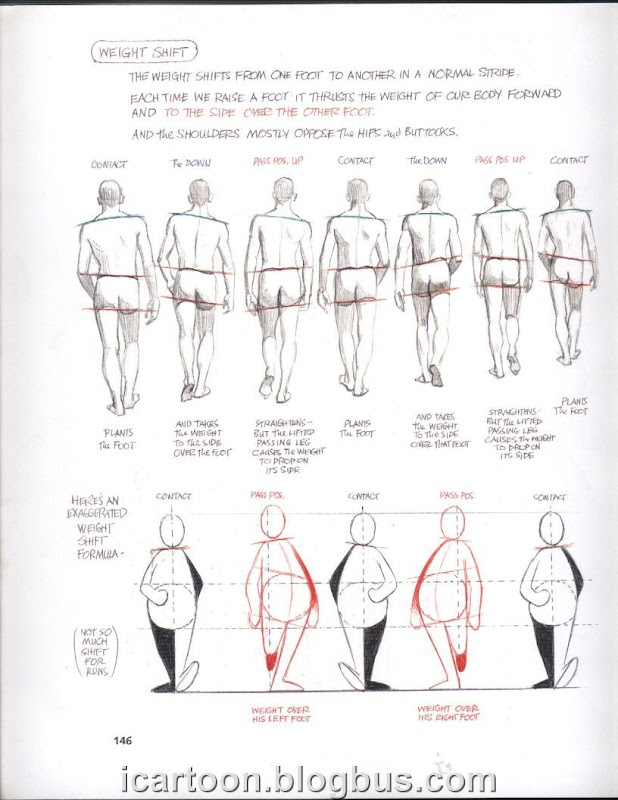
I tried several version of drawings, for example for the book Tezuka School of Animation and The Animators Survival Kit. but the 2d walking cycles didn't look quite like a female.
Walking Cycle from The Animators Survival Kit 
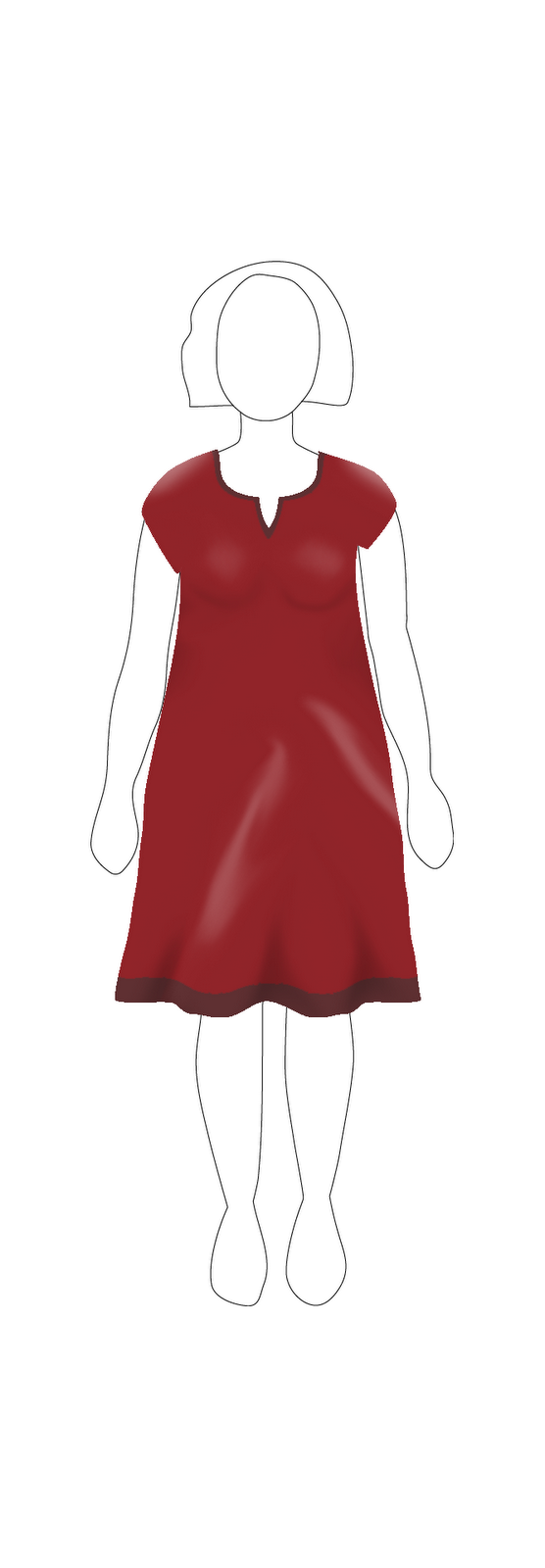
 So I accept Felix and Rudy's idea about download a fashion show video from youtube and picked some frame to simulate.

I picked two dresses in this video and selected 1 frame in each 4 frames. Drew them in AI and color with PS. And with the 8 images, I made the animation with the following codes:


class Character {
int xpos, ypos;
int xpos0, ypos0;
float scale;
PImage[] images;
int count;
int increase;
Character(int xpos, int ypos, float scale, PImage[] images, int increase) {
this.xpos = xpos;
this.ypos = ypos;
this.xpos0 = xpos;
this.ypos0 = ypos;
this.scale = scale;
this.images = images;
this.increase = increase;
for(int i =0; i < images.length; i++) {
images[i].resize((int)(images[i].width * scale), (int)(images[i].height * scale));
}
count = 0;
}
void move() {
ypos += increase ;
if(ypos > ypos0 + 200) {
ypos = ypos0 + 200;
return;
}
if(increase != 0)
xpos = xpos0 - (int)(((ypos - ypos0) * (ypos - ypos0) / 400));

count += 1;
}
void draw() {
image(images[count % images.length], xpos, ypos);
}
}


Reference:
1. The animator's survival kit(Williams, Richard, 2001)
2. Tezuka School of Animation, 1: Learning the Basics(Tezuka Productions, 2003)
3. 2009 Love collection by Enzoani Runway Video(http://www.youtube.com/watch?v=UXPxEnKR0AU