Showing posts with label art. Show all posts

8/10/12

Characters: the Magic Mirror

The magic mirror is an important part in my project to help the user choose their dress by finishing a body shape test and a color test.

As Ines's suggestion, I used a vintage style to create an old fashion and mystery feeling. The outer gold barrier were created in AI. Then spread some golden sparkles with processing coding, dividing then to difference Alpha value.


Sparkle() {
    angle = random(0, 360);
    shift = 0;
    shiftSpeed = random(-0.01f, 0.01f);
    widthLimit = (float)rnd.nextGaussian() * 50;
    angularSpeed = random(PI/720, PI/180);
    float tmp = random(0,1);
    if (tmp < 0.4) {
      //c = new Color(72,7,1);
    c = new Color(134,80,16);
    } else if (tmp < 0.8) {
    //c = new Color(113,28,0);
    c = new Color(215,179,101);
    } else {
    //c = new Color(157,73,26);
    c = new Color(212,217,213);
    }
  }
   
  void move() {
    angle += angularSpeed;
    if (angle > 360) {
      angle -= 360;
    }

    shift += shiftSpeed;    
    shiftSpeed += random( -0.05f, 0.05f );
    if (shift > widthLimit) {
      shiftSpeed = 0;
    }
    else if (shift < -widthLimit) {
      shiftSpeed = Math.abs(shiftSpeed) * 0.5f;
    }
  }


To make the interacted effect more magical, I add an water spreading effect when the mouse is in the mirror, which was inspired by the Magic Water Effect of Rodrigo Amaya in OpenProcessing.

void waterEffect() {
  //Toggle maps each frame
  i=oldind;
  oldind=newind;
  newind=i;

  i=0;
  mapind=oldind;
  for (int y=0;y<height;y++) {
    for (int x=0;x<width;x++) {
  short data = (short)((ripplemap[mapind-width]+ripplemap[mapind+width]+ripplemap[mapind-1]+ripplemap[mapind+1])>>1);
      data -= ripplemap[newind+i];
      data -= data >> 5;
      ripplemap[newind+i]=data;

  //where data=0 then still, where data>0 then wave
  data = (short)(1024-data);

      //offsets
  a=((x-hwidth)*data/1024)+hwidth;
      b=((y-hheight)*data/1024)+hheight;

    //bounds check
      if (a>=width) a=width-1;
      if (a<0) a=0;
      if (b>=height) b=height-1;
      if (b<0) b=0;

      ripple[i]=texture[a+(b*width)];
      mapind++;
  i++;
    }
  }
}


Reference:
1. Algorithms for visual design using the Processing language(Terzidis, Kostas, 2009);
2. Processing(Greenberg, Ira, 2007);
3. Magic Water Effect by Rodrigo Amaya (http://www.openprocessing.org/sketch/43543);

8/9/12

Characters: the House

In this project, I'm trying to finish the animation with ProcessingJs coding instead of traditional images, which can speed up online access and easily interact with.
The House of Cinderella
For the house, what I need to make is the building, the barrier and the path. With coding, they can be scale and translate.

The building was separated into quad, triangle and rectangle, while the windows was made with arc and line, and the door was made of ellipse and rectangle. 

void draw() {
stroke(brown.getRed(), brown.getGreen(), brown.getBlue(), 200);
strokeWeight(2.0f);
fill(background2.getRed(), background2.getGreen(), background2.getBlue(), 150);
quad(posX - 90 * scale, posY, posX + 100 * scale, posY, posX + 120 * scale,
posY + 40 * scale, posX - 110 *scale, posY + 40 * scale);
triangle(posX - 130 * scale, posY + 20 * scale, posX - 65 * scale, posY + 75 * scale, posX - 180 * scale, posY + 75 * scale);
 
fill(background.getRed(), background.getGreen(), background.getBlue());
rect(posX - 95 * scale, posY + 40 * scale, 200 * scale, 120 * scale);
rect(posX - 170 * scale, posY + 75 * scale, 75 * scale, 80 * scale);
line(posX - 120 *scale, posY + 160 * scale, posX + 120 *scale, posY + 160 * scale);
 
rect(posX - 20 * scale, posY + 80 * scale, 40 * scale, 80 * scale);
fill(brown.getRed(), brown.getGreen(), brown.getBlue(), 200);
ellipse(posX + 10 * scale, posY + 120 * scale, 5 * scale, 5 * scale);
 
fill(background.getRed(), background.getGreen(), background.getBlue());
window(posX, posY, 1.0f * scale);
window(posX + 5 * scale, posY + 80 * scale, 0.8f * scale);
window(posX - 110 * scale, posY + 80 * scale, 0.8f * scale);
window(posX - 180 *scale, posY + 110 * scale, 0.7f * scale);
}

void window(float posX, float posY, float scale) {
strokeWeight(4);
fill(background.getRed(), background.getGreen(), background.getBlue());
arc(posX + 70 * scale, posY - 3 * scale, 40 * scale, 40 * scale, -PI * 0.95f, -PI * 0.05f);
noStroke();
rect(posX + 55 * scale, posY - 14 * scale, 30 * scale, 34 * scale);
stroke(brown.getRed(), brown.getGreen(), brown.getBlue(), 200);
strokeWeight(2);
line(posX + 55 * scale, posY - 14 * scale,posX + 55 * scale, posY + 20 * scale);
line(posX + 85 * scale, posY + 20 * scale,posX + 85 * scale, posY - 14 * scale);
stroke(brown.getRed(), brown.getGreen(), brown.getBlue(), 150);
line(posX + 70 * scale, posY + 20 * scale,posX + 70 * scale, posY - 20 * scale);
line(posX + 55 * scale, posY - 5 * scale,posX + 85 * scale, posY - 5 * scale);
strokeWeight(3);
stroke(brown.getRed(), brown.getGreen(), brown.getBlue(), 200);
line(posX + 50 * scale, posY + 20 * scale,posX + 90 * scale, posY + 20 * scale);
}

The barrier was made with ellipse and line, which was similar to the house.

For the path, which was a curve running from the house to the end of the whole scene. So I discuss with a Mathematician Benetin and did some research on math, finally we decided to use Interpolation Polynomials to simulate the curve.
Interpolation Polynomials curve
The expression are p(x) = - 475 - 2960x -5918x^2 -3880x^3 plus a diagonal  x=3(y - 300).
v1.0 of the path
Then I simplified the curve and used some quad to make the path. 
for(int i = 0; i < 15; i++) {
fill(background2.getRed(), background2.getGreen(), background2.getBlue(), 100);
noStroke();
int px = 680 - (int)(i * i * 0.8);
int py = 240 + i * 20 + (i-1) * (i-2)/3;
quad(px - 35 - 3 * i, py, px + 3 * i + 35, py , px + 3 * i + 33, py + 2 * i/4 + 14, px - 39 - 3 * i, py+ 2 * i/4 + 12);
}


Reference:
1. Algorithms for visual design using the Processing language(Terzidis, Kostas, 2009);
2. Processing(Greenberg, Ira, 2007);
3. Interpolation Polynomials (http://www.math.ucla.edu/~ronmiech/Interpolation/HTMDOCS/Introduction/Interpolation_Applet.htm);

7/10/12

Basic Body Shapes By AI


Thanks to Ines's help, I managed to simplify the hand drawing of the 12 body shapes last semester with Adobe Illustrator. And as Ines suggested, I added some underwear based on the rules on look-fabulous.com.

Ines's Design of the smooth body shapes


Reference:
1. Figure drawing for fashion design(Drudi, Elisabetta, 2001);
2. Fashion in costume 1200-2000(Nunn, Joan, 2000);
3. Technical drawing for fashion(Szkutnicka, Basia, 2010);
4. Contemporary lingerie design(Dominy, Katie, 2010);

5/17/12

Some Other Character Design in Processing

Trying to realize some characters in Processing, use simple lines and shapes.

Chicken in different angle by Processing
Chicken: Build the body with 360' vertexs, eyes by ellipse, mouth by 4 vertexs, feet by 3 lines.
Dynamic: The body can rotate according to the mouse, also there is some animation of the mouth.


Different Statuses of the Magic Stick
Magic Wand: Build the stick with line, every drop of light with vertex, and rotate 45' each.
Dynamic: The light is always rotating around the stick, normal status is blue, when active it turn orange.

5/16/12

12 Body Shape Defined by Hand Drawing

For the getting dress part interaction of my project, I'm doing some modeling simulation for different body shapes base on the theory of Trinny and Susannah's 12 Body Shapes.

The process for my body shape hand drawing is:
1. Visite the Website of Trinny and Susannah, learn about their definition of a certain body shape.  Try to search more information through Google.
2. Find out some famous person in this certain body shape, and get her body measurements through a website named How Much Do They Weight.
3. Enter the data of this person's body size into OptiTex online 3D model creation, create the model and download the image of three angle.
4. Based on the image of the model, draw the 2d image of the character in PhotoShop.
BodyShape: Apple 

Apple Shape is: a big stomach, thick waist, average breasts, a flattish bum and okay legs;
Model: Beth Ditto 39' 33' 41'


BodyShape: Bell

Bell Shape is: small shoulders, small tits, small waist, big thighs, big bottom;
Model: Hillary Clinton 34' 28' 35'

BodyShape: Brick

Brick Shape is: broad shoulders, no waist, average tummy, flat bum, chunky thighs, chunky calves;
Model: Kim Cattrell 34' 27' 35'

BodyShape: Cello

Cello Shape is: big boobs, short waist, big hips, big bottom, big thighs, slim lower legs;
Model: Oprah Winfrey 36' 25' 35'

BodyShape: Column

Column Shape is:  shoulder width the same as hips, slight waist, longer legs;
Model: Nicole Kidman 85/63/86

BodyShape: Cornet

Cornet Shape is: broad shoulders, small boobs, no waist, slim hips, long slim legs;
Model: Cameron Diaz 34' 23' 36'

BodyShape: Goblet

Goblet Shape is: broad shoulders, big boobs, no waist, narrow hips, long legs;
Model: Catherine Zeta Jones 34' 25' 36'

BodyShape: Hourglass

Hourglass Shape is: big tits, small waist, short waist, big hips, generous thighs;
Model: Salma Hayek 36C' 25' 37'

BodyShape: Lollipop

Lollipop Shape is: big tits, slight waist, slim hips, long legs;
Model: Angelina Jolie 36' 27' 36'

BodyShape: Pear

Pear Shape is: small tits, long waist, flat tummy, saddlebags, heavy legs;
Model: Sandra Bullock 34C' 24' 34'

BodyShape: Skittle

Skittle Shape is: average tits, slim waist, ok tummy, big thighs, chunky calves;
Model: Halle Berry 36C' 22' 37'

BodyShape: Vase

Vase Shape is: big tits, gently curving longer waist, hips equal tits, slim thighs and legs;
Model: Kate Winslet 34C' 28' 39'


Reference:
1. The body shape bible(Angie) [Online] Available from: http://youlookfab.com/2007/12/12/the-body-shape-bible/ [Accessed 16st May. 2012].
2. The 12 Shapes Of Trinny and Susannah(Lisa) [Online] Available from: http://bodyshapestyle.com/2008/09/01/the-12-shapes-of-trinny-and-susannah/ [Accessed 16st May. 2012].
3. OptiTex online 3D model creation(OptiTex International Pty Ltd) [Online] Available from: http://ws.optitex.com/optitexwebapplication/demo/snapmodel.aspx [Accessed 16st May. 2012].
4. howmuchdotheyweigh.com(Ever Wonder How Much A Celebrity Weighs?.) [Online] Available from: http://www.howmuchdotheyweigh.com/?s=Kim+Cattrell [Accessed 16st May. 2012].

12/1/11

Cinderella by Phil Porter

Last night I went to see the play of Cinderella, by Phil Porter in Dundee Rep. It's so amazing that all the children and adults I can see loved it.

There's many things that I can learn from the play.  First is the way it told the story, as written in the website, it recreate the story like this:
Cinderella works all day for her father in a floating retirement home for elderly magicians and their assistants. And when she’s not bailing out the family business, she’s bailing out the water! 
Back on dry land, the Queen announces that a ball will be held to find the dashingly handsome young prince a wife, but Cinderella’s wicked stepsisters are determined to ruin her dream of attending the Royal ball. 
With only the retirement home’s magicians to help her, who will work the magic Cinderella needs to get to the ball?
 I liked it because no matter how the background changed, it still focus on the magic and dreams, just as it said in the play "sometimes all you need is a little magic". Especially, it gave the characters some new dispositions. Cinderella was recreated as a girl no so weak, but still kind-hearted and have a strong sense of responsibility. She didn't go to the ball for the prince, instead she just wanted to be happy and beautiful for just one night. That's more understandable in nowadays. And the prince was someone who want to be "true me" and miss the simple but happy live before becoming a member of  nobility. And obviously, every audience loved its funny details.

For the stage, the play only had 3 scene: the ship(Cinderella's room and the magicians' dinning room), the castle. I think this is really intelligent because this covered the most famous part of the story already. In my project, I will also concentrate on the castle and Cinderella's room.

Another impressive thing I got from the play was to catch the audience's attention by casting a drop of light to a certain character on the stage. I can do it with HTML5, like the example I collected before on Normal Mapping with Javascript and Canvas.

There was one thing that really impressive me after the play. A lady asked her friend how she thought of this show, her friend said "I love it, it's happy, maybe because it's so easy to understand". That reminded once we talked about the definition of animation in  class, we looked back to a lot of early animations of producers such as Disney. Most of they are simple and just make you laugh. Nowadays, the development of technique allow the outcome of animation to have more possibility, but I think there's something that never change. That's take animation as a tool to write out what you see and feel from life, to recreate this into something simple and easy to accept, to help people better understand and pursuit something meaningful.

11/22/11

Life Drawing Pratice

This semester I takes a life drawing class on every Thursday morning. The teacher is very nice, and after this practice for two month, I really fall in love with this kind of sketch.
Sketch@ Oct.
Sketch @ Oct.
Sketch @ Nov.
Sketch @ Nov
At first, I was lack of experience and always feeling to shy to draw. After each picture, I just wondered oh, what the hell am I drawing! Then the teacher told me to focus on the lines and scale of the body, and be more confident to starting drawing. Now it's great that I began to just enjoy the feeling of drawing, and then I look back to my drawing, somethings I started to like it, cause you can see your improvement through these 2 months.

For the next 2 month, I'm going to do some drawing practice on Models of different body shape, and try to do so sketch on fashion design, hope this will contribute to my project.

11/18/11

Art Style Inspiration——samuel123

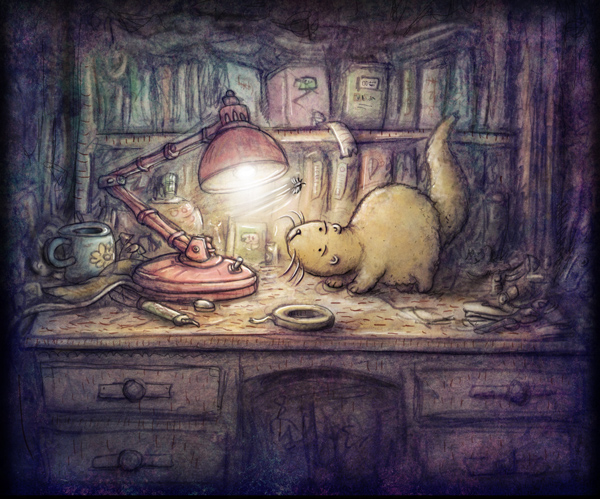
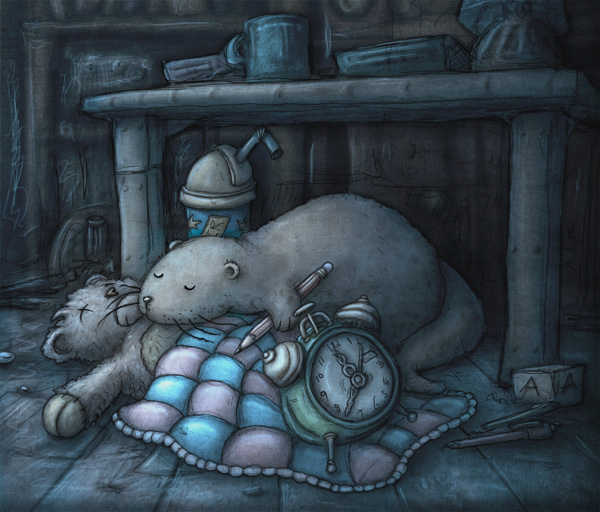
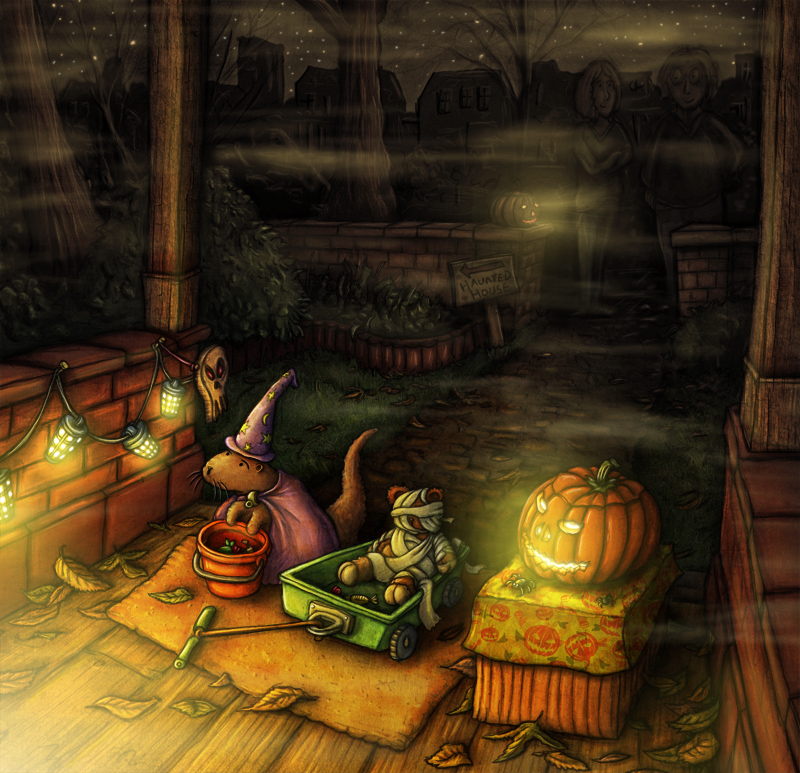
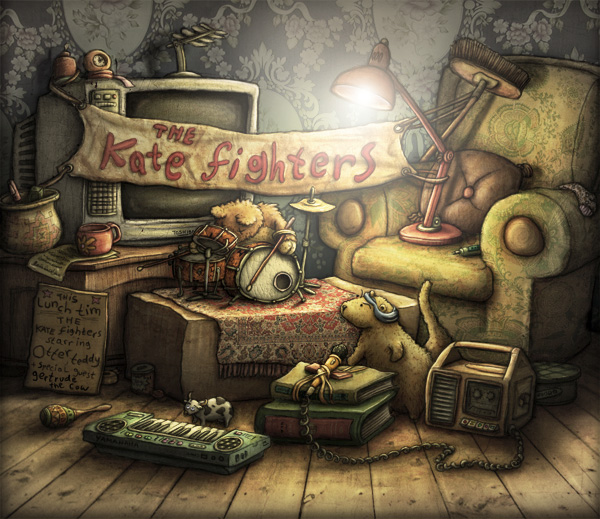
For these months, I am trying hard to find the art style for my project. I want it to have light, cause I want to show the mouse position by a drop of light. And I want it to be pleasant and comfortable. When I saw the gallery of samuel123, I knew I got it.
From his website, we see that he's an artist from UK, and he's always drawing a mole named Otter in specific occasion.

Otter and the Mothby ~samuel123

This one is my favorite, telling a story about Otter met a moth. I really like the curious face of Otter, and the desk and book make the scene full of fun.

Here are some more his works.

staying up all nightby ~samuel123

Halloweenby ~samuel123

This one made me think about Cinderella's magical pumpkin car.

Otter Bandby ~samuel123

To find more about the story of Otter, you can visit I am Otter.

By the way, I really recommend the website deviantart, where you can discover many awesome artist, their self description and their favorite art works, so you can see what inspires these artists.